By Skydimo Tony, Senior Engineer · Updated 2026-10-20
How a Screen Color Sync Monitor Backlight Works
A monitor backlight is an LED light strip mounted on the back of your display that casts light onto the wall behind it; a screen color sync backlight goes further and changes color in real time to match the edges of the picture on screen. It is the core of most PC monitor ambient lighting setups.
Don’t confuse it with a monitor light bar (a “screen bar”): a light bar clips onto the top of the monitor and shines down onto your desk for task lighting, while a screen-sync backlight sits behind the monitor and lights the wall with the colors on screen for a more immersive PC backlight. They do different jobs and can be used together. Skydimo’s Monitor Ambient Light Strip and Monitor Ambient Light Strip (Pro) are the screen-sync kind.
In this guide, you’ll learn:
- what a screen-sync monitor backlight is and when it helps,
- how screen-sync actually works,
- how it differs from a plain LED strip and smart bulbs, and which Skydimo kit fits your monitor,
- and the Skydimo sync settings that make it immersive.
Looking for mounting steps, strip length or eye-comfort brightness? See the Monitor Backlight Setup guide.
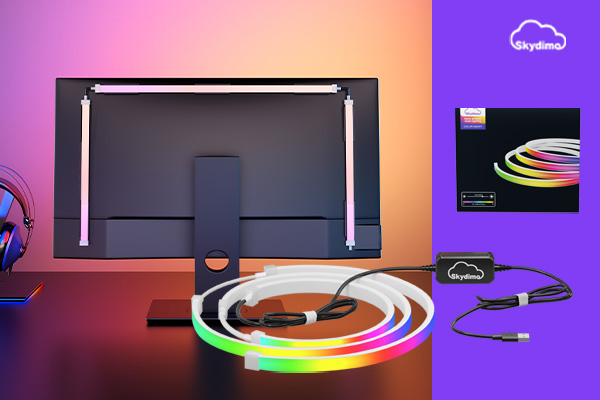
1. What is a screen-sync monitor backlight?
A screen-sync monitor backlight has three parts: an LED strip around the back of the monitor, a controller, and software on your computer (such as Skydimo). Unlike a plain strip that shows one fixed color, its colors are driven by what is on screen: a blue sky on the left side of the picture turns the left side of the strip blue; an explosion at the top turns the top edge orange.
A well-configured screen-sync backlight:
- extends on-screen colors onto the wall for more immersive movies and games,
- creates a soft halo behind the display (for eye-comfort brightness tips, see the Monitor Backlight Setup guide),
- and can switch to static scenes or music-sync when you are not watching anything.
For a wider view of desk and room lighting, see the PC Ambient Lighting Guide.
2. How does screen-sync work?
Screen-sync can be summarized in four steps:
- Capture: Skydimo reads the picture of the display you select;
- Sample zones: the screen edges are split into capture regions (top, left, right, etc.) and the dominant color of each region is calculated;
- Map to LEDs: using your LED count, starting side and direction, each region’s color is sent to the matching segment of the strip;
- Smooth the output: parameters such as smoothing filter out flicker so transitions look natural.
Because everything happens in software on your PC, a screen-sync monitor backlight needs no camera and does not depend on monitor features. Some protected content can limit screen capture; we have not yet systematically tested which players or games are affected. If it happens, try another capture mode in Skydimo or use music-sync as a fallback.
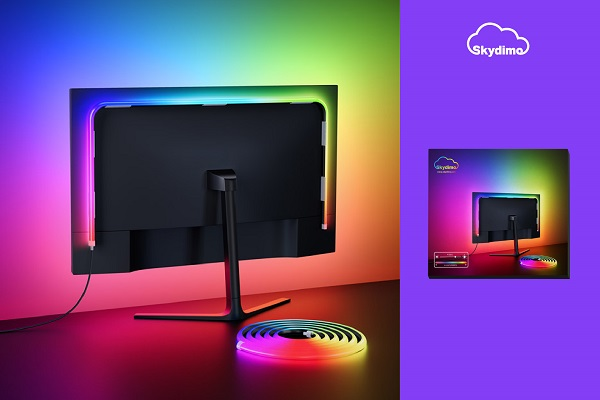
3. Screen-sync backlight vs plain LED strip vs smart bulbs
| Screen-sync monitor backlight | Plain LED strip | Smart bulbs / smart lamps | |
|---|---|---|---|
| Follows on-screen colors | Yes, per edge zone in real time | No, fixed colors or preset animations | Usually one color per bulb, limited zoning |
| Where it goes | Back of the monitor, 3 or 4 sides | Desk edge, wall or monitor back | Lamps, ceiling fixtures, room sockets |
| How it’s controlled | PC software (e.g. Skydimo) | Remote or phone app | Phone app / smart-home platform |
| Best for | Movies, gaming, long monitor sessions | Decoration, basic backlight | Whole-room lighting and scenes |
Which Skydimo kit fits your monitor
| Kit | Coverage | Monitor sizes |
|---|---|---|
| Monitor Ambient Light Strip | 3-sided (top + left + right) | 24 / 27 / 32 / 34 / 49 inch |
| Monitor Ambient Light Strip | 4-sided (adds bottom) | 24 / 27 / 32 / 34 inch |
| Monitor Ambient Light Strip (Pro, side-glow) | One-piece, flat-back monitors | 24 / 27 / 32 / 34 inch |
- 3-sided or 4-sided: 3 sides suit monitors that sit close to the desk; 4 sides give a full frame when there is space below the screen.
- Pro: dual USB power and a 45° light emission design for softer wall projection.
- Fit for ultrawide or curved monitors beyond these sizes: unverified — check the product page.
Product details: Monitor Ambient Light Strip · Monitor Ambient Light Strip (Pro) · All products
Official store: Ambient LED Strip Lights · Pro Side-Glow LED Strip
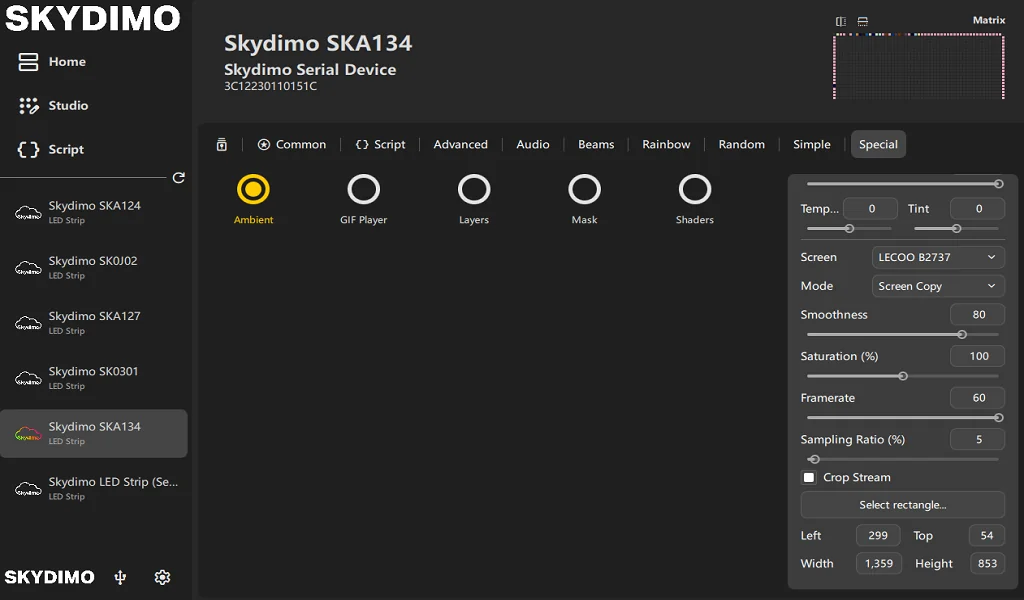
4. Set up screen-sync in Skydimo
Strip already mounted and connected? (If not, follow the mounting steps in the Monitor Backlight Setup guide first.) Then:
- Download Skydimo from the download page — Windows, macOS, or Linux (beta, x86_64 only). On macOS, screen-sync needs the Screen Recording permission.
- Detect the device: open Skydimo, go to the Devices page and click your device; if it doesn’t appear, follow the checklist in the FAQ.
- Set LEDs and direction: set the LED count to match your strip and choose the starting side (top / bottom / left / right) and direction (clockwise / counter-clockwise).
- Enable screen-sync: switch to Screen-sync mode and select the display the strip is mounted on.
- Map the edges: in the preview, map each screen edge to its strip segment; the Recommended edition supports pixel-level layouts. If left and right are swapped, change the installation direction or flip the mapping in the layout editor.
- Tune smoothing: more smoothing feels calmer for movies; less feels more responsive in games.
Settings are saved automatically. Brighter is not always more immersive — a glow that roughly matches the screen looks more natural; for long-session eye-comfort brightness, see the Monitor Backlight Setup guide.
Resource use (our tests): about 46–49 MB memory and under 1% CPU in the background; about 300 MB total with the settings window open. Privacy: no data is collected by default; if you turn it on, only anonymous usage data is sent, and it is used to improve the software.
5. FAQ
Is a monitor backlight the same as a screen-sync backlight?
Is a monitor backlight the same as a monitor light bar?
Does a screen-sync monitor backlight need a camera?
Will it fit my monitor?
What is the difference between the standard strip and the Pro?
Do I need screen-sync on all the time?
Does Skydimo use a lot of system resources?
Which systems can run screen-sync?
Does Skydimo collect data?
Keep reading:
- Monitor Backlight Setup: mounting, strip length and eye-comfort brightness;
- PC Ambient Lighting Guide: lighting the whole desk, not just the monitor;
- Download Skydimo · Supported Devices · Browse products